
Math without fear
If a kid is doing math and having fun, scoring it harshly — or comparing them to another kid — is the fastest way to kill it. So we simply don't. No countdown clocks. No red pens. No leaderboards ranking your kid against anyone. A wrong answer gets a friendly retry with extra help, not a buzzer. The harshest thing this app ever says is "Try again!"
Why no timers?
Stanford math-education professor Jo Boaler's research review found that timed tests are a major trigger of math anxiety — observed in kids as young as five — and that time pressure blocks the working memory kids need to do math at all.
Why we do the explaining
A study of 438 first and second graders found that when math-anxious parents helped most with math homework, their kids learned less math that year and became more anxious themselves. Kitchen-table math battles backfire — so the app does the walking-through instead.
Why understanding comes first
The National Council of Teachers of Mathematics' position is that real fluency is built from conceptual understanding — connecting procedures to concepts in ways that make sense to students — not from memorizing faster.
"The old way was faster…" Yes — for you.
The shortcuts you learned are faster once you already have number sense. The "weird" new methods on your kid's homework exist to build that number sense. Here's our trick: the app steps kids through each model and does the heavy lifting — they tap along, one small choice at a time — so they absorb the why without grinding through the work. The benefit, minus the tears.
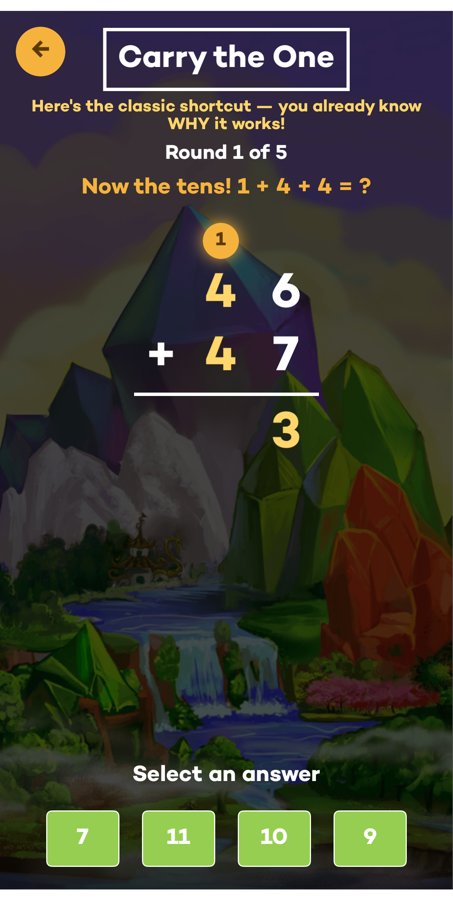
Take "carry the one."
You learned it as a rule to memorize. In Fun With Learning, kids watch the carried 1 actually ride up into the tens column — gold and glowing, one step at a time.
By the end the app says it out loud: "46 + 47 = 93 — and you know WHY it works!" That same "show me why" idea runs through 20+ visual models, covering every kind of math from counting to long multiplication.
Ten frames & bead racks
The classic five-and-ten structure, in gold. Kids see how 7 is "five and two more" — the foundation every later trick is built on.
Number bonds & fact families
A whole on top, two parts below — find the missing piece. Kids learn that 3+5, 5+3, 8−3 and 8−5 are all the same little family.
Arrays & area models
Multiplication you can count: rows and columns of dots, and rectangles split into tens and ones so big products become a few easy pieces.
Base-ten blocks & place value
Build numbers from hundreds, tens and ones, then watch ten ones regroup into a single ten — the real reason "carrying" and "borrowing" work.
A picture for every step — 20+ models and growing
🔢 Counting & number sense
Gold Hops · Count Along · Skip Counting · Number Neighborhood · Bead Rack · Dot Flash
➕ Add & subtract strategies
Ten Frame · Doubles · Number Bonds · Fact Families · Story Bars · More or Less · Friendly Swap · Hop Back
🏗️ Place value & bigger numbers
Block Builder · Partial Sums · Expanded Form · Carry the One · Borrow Power
✖️ Multiply & divide
Array Town · Group Garden · Double Trouble · Fair Share · Stack It Up · area-model multiplication & division
Every model is a short, self-paced, no-fail activity — and each one opens with a friendly "How to play" card, so kids (and parents) always know what to do. They live one tap away inside the games, right when a brain wants the explanation.
Watch the models come alive
Real gameplay — the concept builds right on the screen.

Purposeful screen time you don't have to feel guilty about
Reduce math anxiety and give your child a safe, pressure-free space to learn at their own pace — and discover what actually interests them. They'll be excited to tell you about it at dinner.
- Take a well-earned break while screen time works for you
- Praise and encouragement built into every session — wrong answers get a gentle retry, never a buzzer
- Homework looks weird? The app walks your kid through area models and number bridges so the kitchen table doesn't have to become a battlefield — research shows tense homework help backfires
- No timers, no harsh scores, no comparing your kid to anyone — fun is the strategy, not the reward
- Profiles for each of your kids on one device, each at their own level
- No ads, no in-app strangers, no chat, no AI chatbots — and a real adult (18+) gate in front of every setting and store screen
- Experts recommend 1,000 books before kindergarten — Story Time helps you rack them up (repeats count!)
A classroom helper kids won't roll their eyes at
You didn't pick the apps the district bought. This one's different — and right now it's free, so there's no purchase order, no pilot program, no committee. Just try it.
- Progress tracked per operation — games played and star ratings for each of the five worlds, so you can see exactly which skills need work
- A profile for every student, each moving at their own pace
- Difficulty tiers map loosely to K–3rd grade: Rookie ≈ K–1st, Hotshots ≈ 1st–2nd, Rockstar ≈ 2nd–3rd
- The visual models are the ones on your wall: area-model multiplication with partial products, number-bridge ("counting up") subtraction, step-by-step long division with a multiply-back check, and subitizing dot patterns for early learners
- Aligned with NCTM's stance that fluency builds from conceptual understanding — practice that reinforces your instruction instead of contradicting it
- No timed drills — consistent with the research on timed testing and math anxiety
- Counting videos in ASL and Mandarin, plus breathing and movement breaks — inclusive content that doubles as a classroom reset
- Science and tech videos (drones, ferrofluid, cells) make great lesson warm-ups
- Works offline — no school Wi-Fi heroics required


You teach the breakthrough. The app does the reps.
An hour a week with you can't carry a kid alone — and worksheets between sessions kill the spark you just lit. Fun With Learning is the practice that keeps your work alive, speaking the same visual language you teach.
- The in-game walkthroughs — area models, number bridges, long division steps — mirror exactly what you draw on paper, so home practice never contradicts your method
- Per-operation stars and games-played counts tell you in ten seconds what to open next session with
- A profile per student on your own tablet — warm up with their weakest world while you set up
- Gentle retries keep confidence intact between sessions — nobody arrives defeated
- It's free right now, so recommending it costs your families nothing
The things you're wondering
Is it really free? What's the catch?
Right now, yes — every world, every level, every video is unlocked, free. We're a small team growing our community, and we'd rather earn your trust than your money first. If paid plans return later, you'll hear it from us up front — nothing gets yanked away mid-lesson.
What ages is it for?
Designed for ages 3–11. The math worlds map roughly to K–3rd grade (Rookie for single digits up to Rockstar for triple digits), while stories, science videos and mindfulness breaks span the whole range.
How is this different from the apps my kid's school uses?
One word: people. Real humans read the stories, run the science experiments, and count in ASL and Mandarin on camera. No robot voices, no worksheet-with-a-mascot. And there's no district login — download it and play in under a minute.
Does it need Wi-Fi all the time?
No. Games work offline, and videos are cached on the device the first time you're connected — perfect for road trips, waiting rooms and airplane mode. Progress syncs back up when you're online again.
Can my kid make purchases or talk to strangers?
No chat, no strangers, no ads, and no AI chatbots anywhere. Every settings and store screen sits behind a real adult (18+) gate, so little fingers can't wander anywhere they shouldn't.
I teach — can I use it with a class?
Yes. Create a profile per student on a shared device, and the progress view shows games played and star ratings per skill for each profile. It's free right now, so there's no purchase order or pilot committee between you and trying it today.
Sounds like your kind of math?
Every world, every level, every video — free right now.